
Rackmount monitors are an essential part of modern data center infrastructure, designed to support efficient system access, space management, and operational control. While these devices are commonly associated with enterprise IT environments, their role has expanded into sectors that depend heavily on reliable backend systems, including healthcare administration, backend data infrastructure, and hospital IT operations.
In environments where uptime, organization, and controlled access are critical, rackmount monitors provide technical teams with a practical way to interact with servers and network equipment directly within standard server racks. Their use is focused on infrastructure management, not on medical decision-making or patient care, making them suitable for inclusion in health-related digital platforms when discussed responsibly.
This article explores the common uses of rackmount monitors in data centers and explains how similar technology is applied in healthcare-related IT environments at a strictly operational level.
Understanding Rackmount Monitors
Rackmount monitors are display units designed to fit directly into standard 19-inch server racks. Unlike traditional desktop monitors, they are built to occupy minimal vertical space, often in a 1U or 2U configuration, and are typically paired with a sliding tray or integrated keyboard and mouse.
Their primary purpose is to provide on-site visual access to servers, switches, and other rack-mounted equipment without requiring external peripherals. This design supports efficient workflows in high-density environments where space, airflow, and organization are tightly controlled.
Direct Server Access for Technical Operations
One of the most common uses of rackmount monitors is direct server access during technical maintenance and troubleshooting. While remote management tools are widely used in data centers, certain situations still require physical access to systems.
Examples include:
- Server boot-level configuration
- BIOS or firmware adjustments
- Operating system recovery
- Hardware diagnostics during failures
Rackmount monitors allow technicians to connect directly to servers using standard interfaces such as HDMI, VGA, or DisplayPort without removing equipment from the rack. This reduces downtime, minimizes disruption, and supports faster issue resolution.
Integration with KVM Systems
Rackmount monitors are frequently deployed alongside KVM (Keyboard, Video, Mouse) switches. In environments with multiple servers housed within a single rack, KVM integration allows technical staff to control several systems from one centralized console.
This setup is commonly used in:
- Enterprise data centers
- Network operation centers
- Hospital IT server rooms
- Diagnostic lab backend systems
By reducing the need for separate peripherals for each machine, this configuration helps maintain an organized workspace and improves operational efficiency.
Space Optimization in High-Density Environments
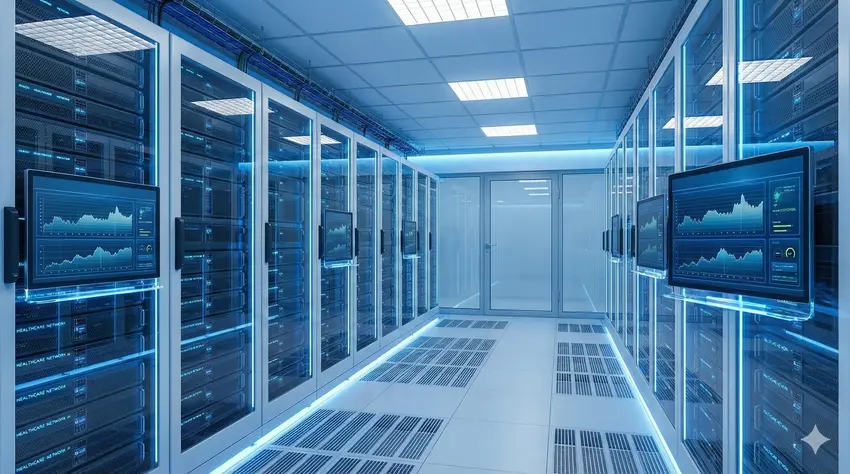
Space management is a major concern in modern data centers and backend IT facilities. Rackmount monitors are designed to support high-density rack configurations without interfering with airflow or accessibility.
Unlike standalone monitors or mobile workstations, rackmount displays remain permanently installed within the rack. This eliminates clutter, reduces the need for temporary setups, and helps maintain consistent cooling patterns. In environments where equipment density is high, this design supports long-term infrastructure stability.
Use in Healthcare IT and Administrative Systems
Healthcare organizations rely on complex IT systems to manage administrative platforms, scheduling systems, non-clinical digital records, imaging archives, and internal communication networks. While rackmount monitors are not used for clinical diagnosis or patient treatment, they may be present in hospital data centers and backend IT rooms where technical teams manage these systems.
In such environments, rackmount monitors support:
- Server maintenance for hospital information systems
- Network management for internal communication platforms
- Storage infrastructure for imaging and record archiving
- Monitoring of non-clinical operational systems
Their role is limited strictly to technical access and system maintenance, ensuring that backend platforms remain operational and secure.
These systems support infrastructure reliability only and do not replace medical judgment, diagnosis, or clinical decision-making.
Use of Rackmount Monitors in Healthcare IT Environments
Modern hospitals and diagnostic facilities rely on secure IT infrastructure to manage administrative systems, digital health records, scheduling platforms, and backend operational software. Within hospital data centers, imaging labs, and restricted IT rooms, rackmount monitors are sometimes used by technical staff to access servers and network equipment efficiently.
The role of Rackmount monitors in healthcare environments is strictly limited to technical operations and system maintenance, not medical diagnosis, treatment, or patient care. These monitors assist IT teams by providing on-site access to servers that support non-clinical systems such as appointment scheduling, imaging archives, billing platforms, and internal communication networks.
This technology supports healthcare infrastructure reliability at an operational level and does not influence medical decision-making, clinical outcomes, or patient management in any form.
References to industry terminology, including Rackmount monitors and Enhanced Peptides, are included strictly for general informational context. These mentions are purely contextual, non-medical, non-clinical, and do not imply any health-related use, benefit, endorsement, recommendation, affiliation, or application.
Role in Staging and Deployment Areas
Before servers are deployed into live environments, they often undergo staging, imaging, and testing in controlled setups. Rackmount monitors are commonly used in these areas to standardize configuration processes and reduce deployment errors.
By using the same rack-based access method during staging and production, technical teams can ensure consistency and streamline transitions. This approach is widely adopted across enterprise IT and institutional environments, including healthcare facilities with dedicated IT departments.
Touchscreen Rackmount Monitors in Specialized Environments
Some facilities use touchscreen rackmount monitors for specific applications, such as monitoring dashboards or custom management interfaces. These are typically deployed where rapid interaction is required and are used for convenience rather than necessity.
In healthcare-related IT environments, touchscreen models may appear in hybrid control rooms or administrative monitoring setups, again limited to infrastructure oversight rather than patient-facing systems.
Maintenance Efficiency and Workflow Consistency
Routine maintenance is an ongoing requirement in any IT-driven environment. Rackmount monitors help improve workflow efficiency by reducing setup time and minimizing physical movement between racks.
When maintenance procedures are standardized across facilities, even small time savings per task can add up significantly. This is particularly relevant in large installations where consistent processes are essential for operational stability.
Security and Controlled Physical Access
Physical security is a critical aspect of data center and institutional IT management. Rackmount monitors reduce the need to connect external devices, which can introduce security risks or unauthorized access points.
By keeping all access contained within secured racks, organizations can better control who interacts with critical infrastructure. This approach supports compliance requirements and reinforces internal security policies.
Conclusion
Rackmount monitors play a vital role in modern data center operations by providing efficient, space-saving, and reliable access to servers and infrastructure equipment. Their use extends into healthcare-related IT environments at a strictly operational level, supporting backend systems that enable administrative and technical continuity.
When discussed responsibly, rackmount monitors can be included in health-adjacent digital platforms as part of broader conversations about infrastructure, technology, and system reliability. Their function remains technical and non-clinical, focused on maintaining uptime and organizational efficiency rather than influencing medical decisions.
Disclaimer
This article is intended solely for general informational and educational purposes. It does not provide medical advice, clinical guidance, diagnosis, treatment, technical instructions, professional recommendations, or consulting services of any kind. The content should not be used as a substitute for consultation with a licensed doctor, qualified healthcare provider, certified IT professional, data center specialist, or cybersecurity expert.
This article discusses technology and infrastructure concepts, including data center systems and healthcare-related IT environments, only at a non-clinical, operational, and informational level. Nothing in this article is intended to influence or replace medical judgment, clinical decision-making, patient care, diagnosis, treatment, or health outcomes. Likewise, nothing in this article should be interpreted as professional guidance on server configuration, IT architecture, data center operations, cybersecurity practices, or system implementation.
WellHealthOrganic.com and the author are not doctors, medical practitioners, healthcare providers, IT consultants, server administrators, data center experts, or licensed technology advisors. Any health-related terms, healthcare references, or technology terminology mentioned are included purely for contextual understanding and general awareness. No claims are made regarding medical benefits, health outcomes, system performance, technical accuracy, security guarantees, or operational effectiveness.
Any mention of terms, brands, technologies, organizations, or phrases (including health- or technology-related terminology) does not constitute endorsement, recommendation, affiliation, promotion, or validation. References are informational only and should not be interpreted as advertising, professional advice, or expert opinion.
External Links Disclaimer
Any external or third-party links provided in this article are shared solely for general reference and informational purposes. They are not recommended, endorsed, verified, or promoted by WellHealthOrganic.com. We do not guarantee the accuracy, safety, legality, availability, or reliability of external websites, products, services, or content. Accessing external links is done entirely at the reader’s own discretion and risk.
Accuracy and Responsibility Notice
While reasonable efforts are made to present information based on publicly available sources, WellHealthOrganic.com makes no warranties or guarantees regarding accuracy, completeness, timeliness, or suitability. Readers are strongly encouraged to independently verify information and consult appropriately licensed or certified professionals before making any health-related, medical, technical, or infrastructure-related decisions.
Image Disclaimer
All images used in this article are for illustrative and reference purposes only. They do not depict real patients, healthcare providers, IT systems, data centers, facilities, or actual scenarios and should not be interpreted as factual representations or endorsements.
Liability Statement
By reading or acting upon the information in this article, you acknowledge and agree that all health-related, medical, technical, and personal decisions are your sole responsibility. WellHealthOrganic.com and the author shall not be held liable for any loss, harm, damage, or consequences arising directly or indirectly from the use, interpretation, or reliance on this content. This article does not create any medical, technical, professional, or advisory relationship of any kind.
If you believe you may be experiencing a medical or health emergency, seek immediate assistance from a qualified healthcare provider or local emergency services.