
Desk work often looks physically easy. You sit down, open a laptop and move through emails, calls and deadlines. However, several hours can pass before you realise that your shoulders feel tight, your eyes are tired or you have barely moved since morning.
The answer is not to chase a perfect sitting position or buy every ergonomic gadget available. A more realistic approach is to make small adjustments throughout the day. Healthy habits for desk workers can include changing position regularly, arranging frequently used items within easy reach, giving the eyes a break and making movement part of the normal workflow.
These ideas apply to office employees, freelancers, students and people working from home. Since every body and workstation is different, the aim is comfort and adaptability rather than one rigid setup.
Important Health Notice
This article provides general educational information. It does not diagnose or treat pain, eye problems, injuries or other health conditions. Anyone with persistent, severe, worsening or recurring symptoms should seek advice from an appropriately qualified healthcare professional. Workplace adjustments may also need to follow an employer’s occupational health and safety procedures.
Why Desk Habits Matter
A desk can keep the body in one position for a long time, especially during focused work. Repeated keyboard and mouse use may also make it easy to hold the wrists, shoulders or neck awkwardly without noticing.
The US Occupational Safety and Health Administration explains that there is no single correct workstation arrangement for everyone. Instead, a workstation should support neutral positions and allow the user to work comfortably. This distinction matters because sitting upright in one fixed pose all day is not the goal. Even a comfortable position can become tiring when held for too long.
It helps to think of desk wellness as a pattern rather than a pose. Your chair setup matters, but so do the way you organise tasks, the frequency of your breaks and what you do away from the desk.
Start With a Comfortable Workstation
Begin with the equipment you already have. Sit as you normally would and notice whether you must reach forward, lift your shoulders or bend your neck to see the screen. Small changes may be enough.
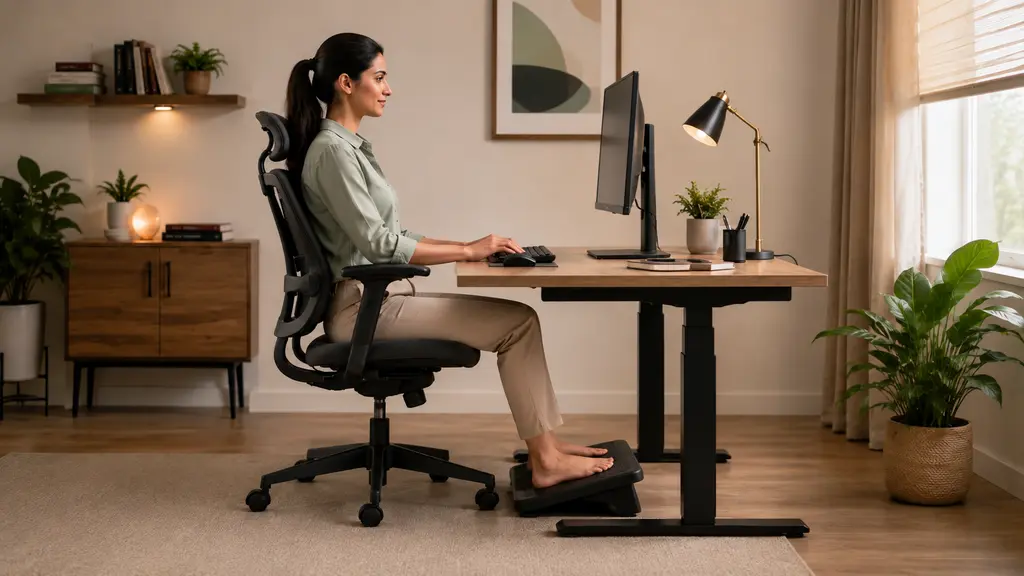
Try to keep the head facing forward rather than repeatedly turning to one side. Relax the shoulders, keep the elbows close to the body and support the feet on the floor or a stable footrest. The keyboard and mouse should be close enough that you do not need to stretch for them. Frequently used objects, such as a phone or notebook, should also remain within easy reach.
OSHA’s guidance describes neutral positioning as a comfortable arrangement in which the joints are naturally aligned. However, this should not become another strict rule. Body size, furniture, tasks and accessibility needs vary, so adjust the setup to the person rather than forcing the person to fit the desk.
Check the Screen Position
Place the main screen in front of you whenever possible. A screen that is too far away may encourage leaning forward, while one placed very low may lead to repeated neck bending. Adjust text size if you find yourself moving closer just to read.
Laptop users sometimes face a compromise because the screen and keyboard are attached. During extended use, a separate keyboard or mouse may make the setup easier to adjust. Still, expensive accessories are not automatically necessary. A safe, stable arrangement that feels comfortable is more useful than a fashionable setup that does not suit your work.
Add Movement Without Disrupting Work
Movement does not have to mean leaving the office for a full workout. Short opportunities can be built into ordinary tasks. Stand while taking a suitable phone call, walk to refill water, use a distant printer or take a brief walk during a scheduled break.
The CDC’s workplace activity guide includes short activity breaks as one way to add movement to the workday. OSHA also advises short pauses for jobs involving prolonged static posture or highly repetitive tasks. During these pauses, workers can stand, stretch or move around where it is safe to do so.
Avoid treating one break schedule as a medical prescription. Work demands and individual needs differ. Instead, use meetings, completed tasks or calendar reminders as prompts to change position. A few minutes of movement is often easier to repeat than an ambitious routine that disappears after two days.
For broader everyday ideas, explore WellHealthOrganic’s Healthy Life guides on balanced routines, movement, sleep and self-care.
Healthy Habits for Desk Workers’ Eye Comfort
Screens do not need to be frightening, but concentrated near work can leave the eyes feeling uncomfortable. People may blink less while focusing, and glare, small text or an unsuitable viewing distance can make screen use feel harder.
Look away from the screen regularly and focus on something farther away. The American Academy of Ophthalmology commonly describes the 20-20-20 approach: after about 20 minutes of near work, look roughly 20 feet away for around 20 seconds. It is a simple reminder, not a guarantee that every eye symptom will disappear.
You can also try these practical adjustments:
- Increase text size instead of leaning toward the display.
- Reduce distracting reflections or glare where possible.
- Match screen brightness reasonably with the surrounding room.
- Keep the screen clean and place it at a comfortable viewing distance.
- Remember to blink, particularly during concentrated tasks.
Persistent blurred vision, headaches, eye pain or continuing discomfort deserves professional assessment rather than repeated self-adjustment alone.
Make Breaks Part of the Workflow
Breaks are easier to maintain when they connect to something that already happens. After sending a report, stand and reset your position. Between calls, look away from the screen. At lunch, move to a different space if available instead of continuing to eat beside the keyboard.
Some people ignore reminders once work becomes busy. In that case, change the environment. Keep water away from the desk so refilling it requires a few steps. Place the waste bin at a sensible distance. When practical, discuss a routine question with a colleague in person rather than sending another message.
Breaks should suit the job. Someone handling customers, machinery or time-sensitive work may need to coordinate them with a manager. The purpose is not to interrupt essential duties. It is to reduce long, unbroken periods of the same task or position whenever the work allows.
Support Energy With Ordinary Daily Choices
Desk wellness extends beyond furniture. Regular meals, access to drinking water and a realistic sleep routine can influence how the workday feels. There is no need to label one snack, drink or morning ritual as the secret to productivity.
Keep water available and drink according to thirst, weather, activity and personal health needs. Choose meals that are practical for your schedule and include a varied mix of foods where possible. If a health condition affects fluid or dietary requirements, follow individual guidance from a qualified professional.
Late work can also blur the boundary between job time and rest. A simple shutdown habit may help: note tomorrow’s priorities, close unnecessary tabs and step away from work messages when your responsibilities allow. Readers can also explore these general sleep hygiene and better sleep habits.
Do Not Turn Posture Into a Source of Stress
Posture advice is often presented as if one small mistake will cause lasting damage. That can make people monitor every angle of their body and worry whenever they slouch. A more balanced approach is to seek a comfortable setup, avoid unnecessary strain and change positions regularly.
Notice patterns without blaming yourself. Do your shoulders rise during busy calls? Does the screen sit off-centre? Do you keep the mouse beyond comfortable reach? These observations can point to useful adjustments.
Pain should not automatically be blamed on posture or desk work. Symptoms can have many causes, and an online checklist cannot identify them. If discomfort continues, affects normal activities, follows an injury or comes with concerning symptoms, seek appropriate professional care.
A Simple Desk-Work Routine
Healthy habits for desk workers are easier to follow when the routine remains flexible. One possible framework is:
- Before starting: Arrange the chair, screen, keyboard and mouse for comfort.
- During focused work: Relax unnecessary tension and change position from time to time.
- Between tasks: Look into the distance, stand or walk briefly when practical.
- Around meals: Step away from the workstation where circumstances allow.
- At the end of work: Close the day deliberately and make space for rest and non-screen activity.
This is not a mandatory timetable. Adapt it around health needs, disability, workspace limitations and job requirements. Consistency matters more than completing every step perfectly.
When Professional Advice May Help
Basic workstation changes are not a substitute for an assessment. Speak with an appropriate healthcare or workplace professional when symptoms are persistent, worsening, severe or interfering with sleep and normal activities. Sudden weakness, significant numbness, loss of coordination, a major injury or sudden changes in vision require prompt medical attention.
An employer may offer an ergonomic assessment or occupational health support. An optometrist or ophthalmologist can assess ongoing visual symptoms, while other qualified professionals may evaluate persistent physical discomfort. The correct route depends on the symptom, location and available healthcare system.
Final Thoughts on Healthy Habits for Desk Workers
A healthier desk day does not require a perfect chair or a complicated routine. Begin with what is easy to change: bring the screen and keyboard into a comfortable position, relax unnecessary tension, look away from the display and break up long periods of stillness.
Most importantly, allow the setup to change with the task. Sitting, standing and moving can all have a place in the day. Healthy habits for desk workers work best when they feel ordinary enough to repeat, not when they become another demanding project.
References
- OSHA: Computer Workstations — Positions
- OSHA: Work Process and Recognition
- CDC: Physical Activity Breaks for the Workplace
- CDC: Adult Activity Overview
- American Academy of Ophthalmology: Computers, Digital Devices and Eye Strain
Medical and Editorial Disclaimer
This article is provided by WellHealthOrganic.com for general informational and educational purposes only. The author and publisher are not acting as doctors, optometrists, physiotherapists, occupational therapists, ergonomists or other healthcare or workplace-safety professionals through this content.
The information does not constitute medical advice, diagnosis, treatment, prescription, an ergonomic assessment or workplace-safety instruction for a particular person or organisation. It should not be used to diagnose the cause of pain, visual symptoms, numbness, weakness, fatigue or any other health concern, or to begin, stop or change professional care.
Individual needs vary according to health history, disability, pregnancy, injury, vision, medication use, job duties, equipment and workplace conditions. Readers should consult appropriately qualified healthcare and workplace professionals for advice suited to their circumstances. Urgent or severe symptoms should be addressed through appropriate local medical services.
External links are included for informational reference only. They do not constitute endorsement, and WellHealthOrganic.com is not responsible for third-party content, services, availability, privacy practices or later changes.
Any decision to rely on or act upon this information is made voluntarily and at the reader’s own discretion and risk. To the fullest extent permitted by applicable law, WellHealthOrganic.com, its owners, editors and the author disclaim liability for loss, injury, harm or adverse outcomes allegedly arising from the use, misuse or interpretation of this content. Nothing in this disclaimer excludes responsibility that cannot legally be excluded.
Images used with this article may be AI-generated and are provided solely for illustration and reference. They do not depict actual patients, professionals, medical conditions, individual workstation assessments or guaranteed outcomes.
Disclaimer
Disclaimer
This article is published by WellHealthOrganic.com solely for general informational and educational purposes. It provides general information about desk-work habits, workstation arrangement, posture, movement breaks, screen use and eye comfort. It does not constitute medical advice, diagnosis, treatment, rehabilitation guidance, an individual ergonomic assessment, occupational-health advice or professional workplace-safety guidance.
WellHealthOrganic.com, its owners, editors and the author are not doctors, physiotherapists, occupational therapists, optometrists, ergonomists, occupational-health specialists, workplace-safety professionals or other qualified advisors in the subjects discussed in this article. The author does not hold a medical, physiotherapy, occupational-therapy, optometry, ergonomics, occupational-health or workplace-safety degree, licence, certification or other professional qualification. No doctor-patient, therapist-client, consultant-client or other professional relationship is created by reading this article.
The information and general suggestions in this article may not be suitable for every person, health condition, disability, injury, workstation, occupation or workplace. Before following any suggestion concerning posture, workstation setup, movement, stretching, screen use, eye comfort or work breaks, readers should consult an appropriately qualified healthcare professional, ergonomics professional or workplace-safety professional. This is especially important for anyone with an existing medical condition, disability, injury, persistent discomfort, vision problem or specific workplace requirement.
Readers should not use this article to diagnose the cause of pain, stiffness, numbness, weakness, headaches, visual discomfort or any other symptom. Persistent, severe, sudden, recurring or worsening symptoms should be assessed by an appropriately qualified healthcare professional. Sudden weakness, significant numbness, loss of coordination, a serious injury or sudden changes in vision may require prompt medical attention.
Any person who chooses to follow, rely upon or act on information contained in this article does so voluntarily, entirely at their own discretion and risk. Readers remain responsible for determining whether any information or suggestion is appropriate for their health, individual circumstances, workstation, job responsibilities and workplace policies.
References and external links to organisations such as the Occupational Safety and Health Administration (OSHA), Centers for Disease Control and Prevention (CDC) and American Academy of Ophthalmology (AAO) are included only for general educational reference. Their inclusion does not mean that these organisations have reviewed, approved, sponsored or endorsed WellHealthOrganic.com, this article or its author. WellHealthOrganic.com does not control and cannot guarantee the accuracy, completeness, continued availability or future content of third-party websites.
By choosing to read, rely upon or act on this article, the reader acknowledges that the information is general, has not been prepared for their individual health, workstation or employment circumstances, and is used entirely at their own discretion and risk. The reader remains solely responsible for obtaining appropriate professional advice before following any suggestion. To the maximum extent permitted by applicable law, WellHealthOrganic.com, its owners, editors and the author accept no liability for any direct, indirect, incidental, consequential or other loss, injury, discomfort, workplace issue, delayed professional care, adverse outcome or damage arising from or allegedly connected with the use, misuse, reliance upon or interpretation of this article or any linked third-party content. Nothing in this disclaimer limits any right or responsibility that applicable law does not permit to be excluded or limited.
Images used in this article are AI-generated and provided solely for illustrative and reference purposes. They do not depict an actual patient, healthcare professional, ergonomics assessment, workplace evaluation or guaranteed result. Images should not be used to assess posture, diagnose a health condition or determine whether a workstation is suitable for a particular person.